
Could a high net worth buildings insurance calculator give you a reliable rebuild value for your home? It can provide a useful starting estimate, but an online result is not automatically a precise assessment of a distinctive or high-value property.
This guide explains what a calculator can and cannot establish, which property details to gather before arranging cover, and when a surveyor’s assessment or tailored insurance advice may be appropriate. You’ll also learn how to treat an estimate as a starting point, not a confirmed rebuild value or guarantee of cover. Reviewing your home’s individual circumstances can help you make a more informed decision about whether the buildings cover you are considering reflects the property you need to protect.
Key Takeaways
- A high net worth buildings insurance calculator can offer an initial estimate, but the information it requests and the results it provides vary by tool.
- Check details such as floor area, construction type, age, storeys and layout before relying on an estimate.
- Compare an online estimate with any insurer assessment or independent professional assessment to decide what suits your property.
- Keep measurement details, source notes and records of property changes so you can explain how you arrived at your figure.
- Use a high net worth buildings insurance calculator as a starting point, then discuss how the estimate relates to your home and cover needs with an insurer or broker.
What does a high net worth buildings insurance calculator actually estimate?
Rebuild cost and market value: why the figures differ
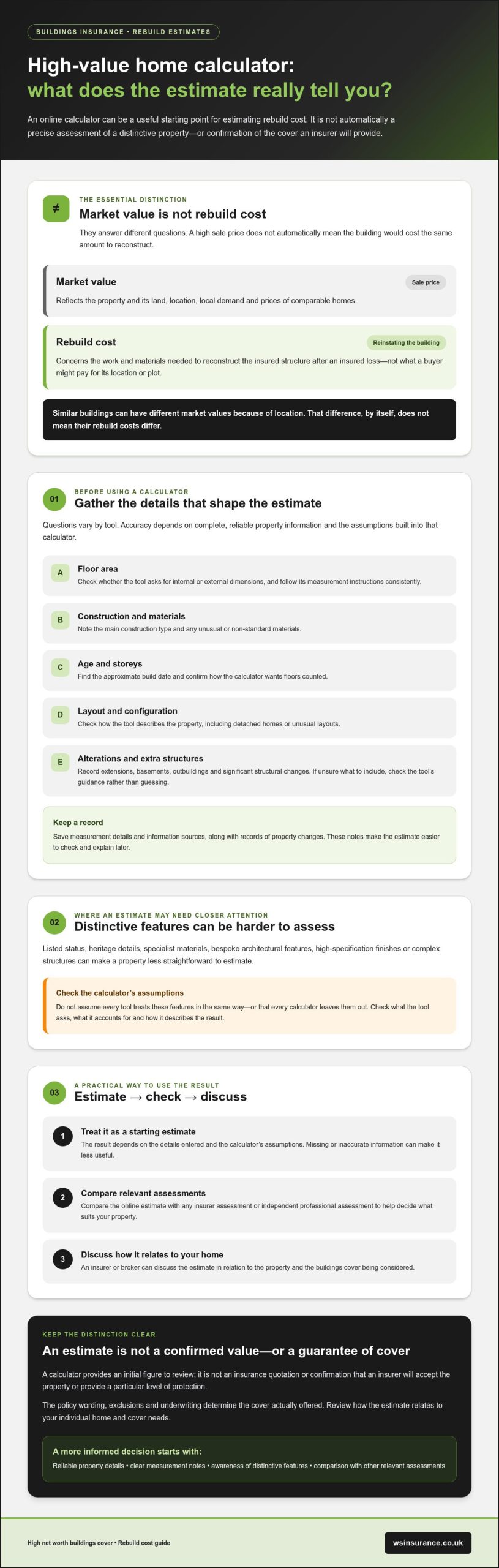
For example, two homes with similar buildings could have different market values because one is in an area where comparable properties sell for more. That difference does not, by itself, mean the more valuable home would cost more to rebuild. The concepts are distinct, as the explanation of replacement cost also illustrates.
What a buildings insurance calculator can and cannot tell you
A calculator uses the property details you provide to produce an initial estimate. Its result depends on the accuracy of those details and the tool’s assumptions, so check what information it asks for and how it describes its estimate. Missing or inaccurate inputs can make the result less useful, especially if the property has features the tool does not account for.
The figure can help you prepare for a conversation about buildings cover, but it cannot confirm that an insurer will accept the property or offer a particular level of protection. The policy wording, exclusions and underwriting determine the cover actually offered. Treat the result as a figure to review, not a definitive valuation or assurance that every reinstatement cost is covered.
How a buildings insurance calculator estimates a high-value home’s rebuild cost
A high net worth buildings insurance calculator uses the details you enter to produce an estimate. Questions vary by tool, so do not assume every calculator asks for the same information or treats a feature in the same way. Calculator accuracy depends on complete, reliable property details and the assumptions built into the tool.
Property details to gather before using the calculator
Before you begin, gather information about the home rather than relying on a quick guess. Common tool-dependent inputs may include:
- Floor area: Check how the calculator defines the area to measure and whether it asks for internal or external dimensions.
- Construction type and materials: Note the main structure and any unusual or non-standard materials.
- Age and storeys: Find the approximate build date and confirm how many floors the tool wants counted.
- Configuration: Check how it categorises the property, such as a detached house or a home with an unusual layout.
- Changes and additional structures: Record extensions, basements, outbuildings and significant structural alterations.
Follow the selected calculator’s definitions and measurement instructions before entering figures. For floor area, check whether the tool expects a particular measurement basis, and use the same approach consistently rather than combining figures from different sources. If you are unsure whether an extension or basement should be included, consult the tool’s guidance instead of guessing. Keeping notes on your measurements and information sources makes the result easier to check later.
Why distinctive features may need individual consideration
Listed status, heritage details, specialist materials and bespoke architectural features can affect how straightforward an estimate is. Depending on the building, high-specification finishes or complex structures may also need closer attention. This does not mean every calculator leaves them out. Check the tool’s stated assumptions and whether it gives you a way to describe these features.
If the property does not fit the calculator’s categories, or you cannot tell how its distinctive elements have been accounted for, treat the output cautiously. An automated estimate may be less useful where the construction or design is unusual. Ask an insurer or suitable property professional how to assess those details. Guidance on high-value home insurance can also help frame the wider cover questions to consider.
Once you have an estimate, keep the inputs and any uncertainties together so they can be discussed when arranging cover. If you’d like to talk through how your property details relate to high net worth home insurance, a broker can help you consider the estimate alongside your circumstances, without treating it as a confirmed rebuild value.
Calculator estimate or specialist assessment: which approach suits your home?
There is no single right method for every property. A high net worth buildings insurance calculator may be a useful first step if the home is relatively straightforward and you have reliable details. Unusual construction or incomplete records may call for further discussion. The appropriate approach also depends on what the insurer requires.
| Method | Useful context | Limitations | Suitable circumstances |
|---|---|---|---|
| Online estimate | Uses details you enter to provide an initial figure. | Depends on accurate inputs and the tool’s intended property types and assumptions. | A relatively straightforward home with complete, consistent information, provided it fits the tool’s criteria. |
| Insurer’s assessment | May involve questions or a review as part of considering the insurance application. | The process and evidence requested can vary; an assessment is not automatically an independent rebuild valuation. | When the insurer asks for more information or needs to clarify the property’s circumstances. |
| Independent professional assessment | Can consider property-specific details that may be difficult to capture in a general estimate. | Whether it is appropriate depends on the property and the insurer’s requirements. | Where unusual construction, substantial alterations or specialist features leave important uncertainties. |
When an online estimate may be a useful starting point
If your home has a conventional layout, its construction details are known and the calculator is designed for that type of property, an online result can help you prepare for arranging cover. Check the tool’s stated scope and limitations first. Save the result, the date, the information entered and any measurement notes so you can explain how you arrived at the figure.
When to ask about a more tailored rebuild assessment
How to use your calculator result when arranging buildings insurance
A calculator result is most useful when you can show how it was reached. Before using it in an insurance conversation, check the property information behind the figure, keep a clear record and review the policy terms separately. This helps an insurer or broker understand both the estimate and any details that may need clarification.
Check the estimate before relying on it
- Review the inputs. Check the measurements, property description and assumptions shown by the calculator. Make sure the details reflect the home as it stands now.
- Compare your information. Where available, use plans, survey documents or building records to check floor area, construction details and structural changes. Note which sources you relied on.
- Correct gaps or errors. Update omissions and rerun the calculator if needed. If a key feature is not represented, record it rather than selecting a description that does not fit.
- Keep an audit trail. Save the result, the date, the tool used, measurements and source notes. Keep records of later changes, such as an extension or significant alteration, so you can revisit the estimate when circumstances change.
- Discuss the figure. Share the estimate and your supporting notes with the insurer or broker, and ask whether further information is needed for the property or the proposed cover.
These steps apply whether you use a high net worth buildings insurance calculator or another estimation method. The result is a useful reference for discussion, not a substitute for checking what the insurer is offering.
Review the wider policy, not just the figure
Ask how the proposed buildings sum insured relates to your estimate and how it is described in the policy wording. Then review the relevant limits, exclusions and excesses, along with any conditions that could affect cover. Pay particular attention to terms for periods when the home is unoccupied and to requirements for notifying the insurer about changes. If any wording is unclear, ask for an explanation before deciding whether the cover suits your needs.
The calculator addresses only an estimate, not every part of the insurance decision. For broader context on arranging protection for a high-value property, read the high net worth home insurance guide. If you’d like to discuss your property details and potential cover needs, discuss your high-value home insurance needs with WS Insurance Brokers.
Get a clearer high net worth buildings insurance decision with broker support
What to prepare before speaking with an insurance broker
Bring information that helps explain both the property and how you reached your figure. A useful starting pack could include:
- The calculator result, the tool used, the date and the details entered.
- Property information, including measurements, construction type, approximate age and any available plans or building records.
- Survey or renovation records, particularly details of extensions, significant structural changes or specialist work.
- A note of distinctive materials, outbuildings and architectural features that may affect reinstatement.
- Questions about the proposed sum insured, policy limits, exclusions and any evidence the insurer may require.
You do not need to resolve every uncertainty before the discussion. Highlighting what you know, what you are unsure about and where the information came from gives the broker a clearer basis for exploring the options.
How WS Insurance Brokers can help you consider cover
WS Insurance Brokers is an independent UK brokerage offering High Net Worth Home Insurance, with access to major UK insurers. The firm can discuss your property details and estimate in relation to your circumstances, then help you consider suitable cover options. The final terms, including acceptance and any claim decision, remain subject to the insurer’s assessment and the policy wording.
WS Insurance Brokers is authorised and regulated by the Financial Conduct Authority. This identifies the firm’s regulatory status; it is not a guarantee of a particular policy, claim outcome or settlement. The brokerage also provides policy administration and claims support, helping clients with those processes without promising that a claim will be accepted or paid.
If you’re using a high net worth buildings insurance calculator and would value a considered discussion about the result, gather your property notes and questions first. Speak to WS Insurance Brokers about high-value home cover to discuss your property and clarify possible next steps.
Take the next step towards clearer home cover
A high net worth buildings insurance calculator can help you form an initial estimate, but the result depends on the property details entered and the tool’s assumptions. Check the figure against your records, note any distinctive features it may not reflect, and remember that the policy wording, limits and exclusions matter as much as the sum insured.
If your home has unusual construction or you are unsure how to interpret the estimate, a broker can help you consider the property’s circumstances and discuss possible cover. WS Insurance Brokers is an independent UK insurance brokerage with access to major UK insurers. The firm is authorised and regulated by the Financial Conduct Authority and provides policy administration and claims support. These services do not guarantee an insurer’s terms or the outcome of a claim.
For a considered conversation about your property and potential next steps, discuss your high-value home insurance needs with WS Insurance Brokers. A little preparation can help you approach the decision with greater clarity and confidence.
Frequently Asked Questions
Is a high net worth buildings insurance calculator accurate?
A high net worth buildings insurance calculator can provide a helpful starting estimate, but it cannot confirm your home’s rebuild cost. Its usefulness depends on whether the tool is designed for your property type, the assumptions it uses and the accuracy of details you enter, such as floor area and construction. Check the result against your records and ask the insurer or broker whether additional evidence is needed before using it to arrange cover.
What is the difference between rebuild cost and market value?
Can I use a standard buildings insurance calculator for a listed or unusual home?
You may be able to use one as an initial guide, but first check whether the calculator is intended for your property type and how it treats listed status, heritage details or unusual construction. Some tools may not accommodate particular features or materials. If the home does not fit the tool’s categories, record what is missing and ask the insurer or broker whether a more tailored assessment or supporting evidence is appropriate.
What information do I need for a buildings insurance calculator?
Requirements vary by calculator, but it may ask for floor area, construction type, approximate age, number of storeys and property layout. Check its measurement instructions before entering figures, and use plans or building records where available. Note extensions, basements, outbuildings and substantial structural changes, too. Keep a record of the details and sources you used so you can check or explain the estimate when discussing cover.
Does a rebuild-cost calculator give me a buildings insurance quote?
No. A rebuild-cost calculator produces an estimate from the details and assumptions used, not an insurer’s quote or confirmation of cover. An insurer considers the information you provide and its underwriting requirements before deciding whether to offer insurance and on what terms. Check the policy wording, sum insured, limits, exclusions and conditions separately. If a feature of your property is not reflected in the estimate, flag it during the insurance discussion.
When should I get professional help with a rebuild-cost estimate?
Consider asking for guidance if the property has non-standard construction, listed or heritage features, substantial alterations, specialist materials or complex design that a calculator may not capture clearly. An insurer or broker can explain what property details or supporting evidence may be needed; a professional assessment may be suitable depending on your circumstances and insurer requirements. Keep available plans, survey records and renovation details to help make that conversation more useful.